
Workflow and process digitalisationAutomate Evolve:
governed SAP processes, without coding
Novacon and PreciselyPrecisely partner since 2016
15 years of hands-on experience with the Automate products.
What it isA workflow platform built for SAP data
Automate Evolve is Precisely’s no-code, low-code platform for SAP processes in which the process and the data depend on each other: product launches, customer and vendor onboarding, G/L account setup, plant maintenance.
Business authors design the forms, rules and workflow on a visual canvas. Requesters and approvers work in role-based web forms, in Excel or in a portal. Data is checked against SAP and business rules before it is submitted, approvals are routed automatically, and SAP is updated in the background. Every step is logged.
Evolve includes Automate Studio and the Studio Manager administration features, so Excel-based SAP automation and workflows run on one platform. For multi-domain master data it works together with EnterWorks: EnterWorks puts the data at the centre, Evolve the process around it.
Product facts
- Vendor: Precisely (formerly Winshuttle Evolve)
- SAP systems: SAP ECC, SAP S/4HANA, certified; compatible with S/4HANA 2025 and S/4HANA Public Cloud 2608 (release 26.1)
- Front ends: Web forms, SmartTables, Excel, internal and external portals
- Integration: REST APIs, SAP Data API, Digital Access API; SOAP, SQL, ODBC, OData, OLE DB
- AI: Built-in MCP server since release 26.1 (Precisely Automate MCP Server)
- Sign-in: NTLM, Kerberos, SAML 2.0
- Deployment: Customer-managed (on-premises, AWS or Azure) or hosted by Precisely
- Includes: Automate Studio and the Studio Manager features
- Our role: Solution design, implementation, licence audit, support
The Precisely Automate familyFrom one SAP activity to end-to-end workflows
Each product contains the one before it and adds a layer. Evolve is the full platform.
1 · Automate the activityAutomate Studio
Exchange data with SAP quickly and easily using Excel.
- Data creation and maintenance
- Data migration
- Operational reporting
- Data stewardship
2 · Control it centrallyStudio Manager
Automate Studio
Share, manage and control Studio solutions across the enterprise.
- Centralised content management
- Granular control of licences, users and policies
- Audit and usage reporting
- Server-side job execution
- Web service execution
An on-premises server component. The SaaS alternative is Evolve Cloud Essentials.
3 · Digitalise the processAutomate Evolve
Automate StudioStudio Manager
Automate and streamline SAP business processes using workflows.
- Advanced form and workflow capabilities
- Cross-functional, end-to-end processes
- Data stewardship via web forms
- Detailed process analytics
- Web portals for external partners
- Third-party integration using REST APIs and other connections
The problem it solvesApprovals in email, data in spreadsheets
- The process is not standardised: every team, site or person does it differently.
- Requests arrive by email or on paper, in different formats.
- The data is incomplete, so it goes back and forth several times.
- Several teams are involved, and nobody sees where a request is waiting.
- Workflows run in different systems, with no common interface or access control.
- Approvals are collected, followed up and archived in email.
Our solutionProcess Automation & Digitalisation
Only need to load or change SAP data in bulk, without a workflow? That is Automate Studio.
What it is forStandardise and digitalise any administrative process, whether it touches SAP or not
Within one department
Standardise a team’s own administrative process, from request to approval and posting.
End to end, across departments
Connect the teams that each add data or approve a step, with one view of where every request is.
With third parties
Bring suppliers, customers and service providers into the process through a portal, without access to your systems.
Most often, our clients use Evolve for the SAP master data and transactional processes they also automate with Automate Studio: master data requests, product launches, journal entries with approval and asset changes. We run our own timesheet process for payroll on Evolve, too, without SAP.
Is your process a good fit?
Evolve is built especially for processes like these:
- The data supports a critical business process, and errors are costly.
- Collecting the data involves many teams.
- The data spans many related objects.
- There are many create and change requests.
- Rules differ by business unit or country, change often and are subject to audit.
Across your SAP landscape and beyond
- Financial Accounting
- Controlling
- Sales and Distribution
- Materials Management
- Plant Maintenance
- Asset Management
- Project Systems
- Production Planning
- Quality Management
- Human Resources
- Non-SAP systems via APIs
Key featuresSix building blocks of a governed process
WorkflowVisual workflow designer
Design the process on a canvas with drag-and-drop nodes and swim lanes for roles.
- Parallel and sequential tasks, loops, rule-based routing
- Reminders, escalations and SLA tracking
- Task reassignment and out-of-office handling
FormsWeb forms and SmartTables
Role-based forms for one record, patented SmartTables for many related records, Excel for mass data.
- Fields shown, hidden or filled by rules
- Import from Excel into a SmartTable
- Supporting documents attached to the request
Data qualityData stewardship
Get the data right before it reaches SAP.
- Live SAP validation and SAP F4 lookups
- Duplicate search against SAP
- Required fields, standardised values, copy from a similar record
SAPDeep SAP integration
SAP is updated in the background, within SAP user rights.
- Automate Studio scripts and BAPIs over RFC
- Fiori and SAP GUI for HTML scripts in workflows
- Validation against SAP before posting
PortalsInternal and external portals
Branded portals built with a widget-based designer.
- External portals for customers and vendors, deployed through Microsoft Azure
- Internal portals on the Evolve server
- Multilingual, with dashboards and chat
APIsIntegration
Connect the process to other systems and automation tools.
- SAP Data API: Studio scripts as a last-mile API into SAP
- Digital Access API: start or update workflows from other applications
- Precisely Data Integrity Suite APIs and data quality pipelines
AI-readyConnect AI to governed SAP processes
Built-in MCP server
Since release 26.1, the built-in MCP server, which Precisely calls the Precisely Automate MCP Server, exposes Automate Studio scripts, SAP OData APIs (read-only by default) and Evolve tasks and processes as tools for MCP-compatible AI assistants such as Claude, ChatGPT and Microsoft Copilot.
Agents inside the workflow
AI agents from our partner DataRock Labs take steps in the workflow, while rules, approvals and the audit trail stay in Evolve.
Intelligent Autocomplete
Proposes field values when users create SAP master data records, starting with the material master, based on patterns in your existing SAP data.
How it worksForm, workflow, actions
on one platform
1 · Design the form
A business author builds the web form, its fields and its rules in the browser-based solution builder.
2 · Create the workflow
The author draws the workflow: roles, approvals, conditions, notifications and deadlines.
3 · Add plugin actions
Plugin actions do the system work, for example an SAP automation script built with Automate Studio.
Evolve runs on its own application server and database, connects to SAP ECC or SAP S/4HANA through the Automate function module, and deploys external portals through Microsoft Azure.
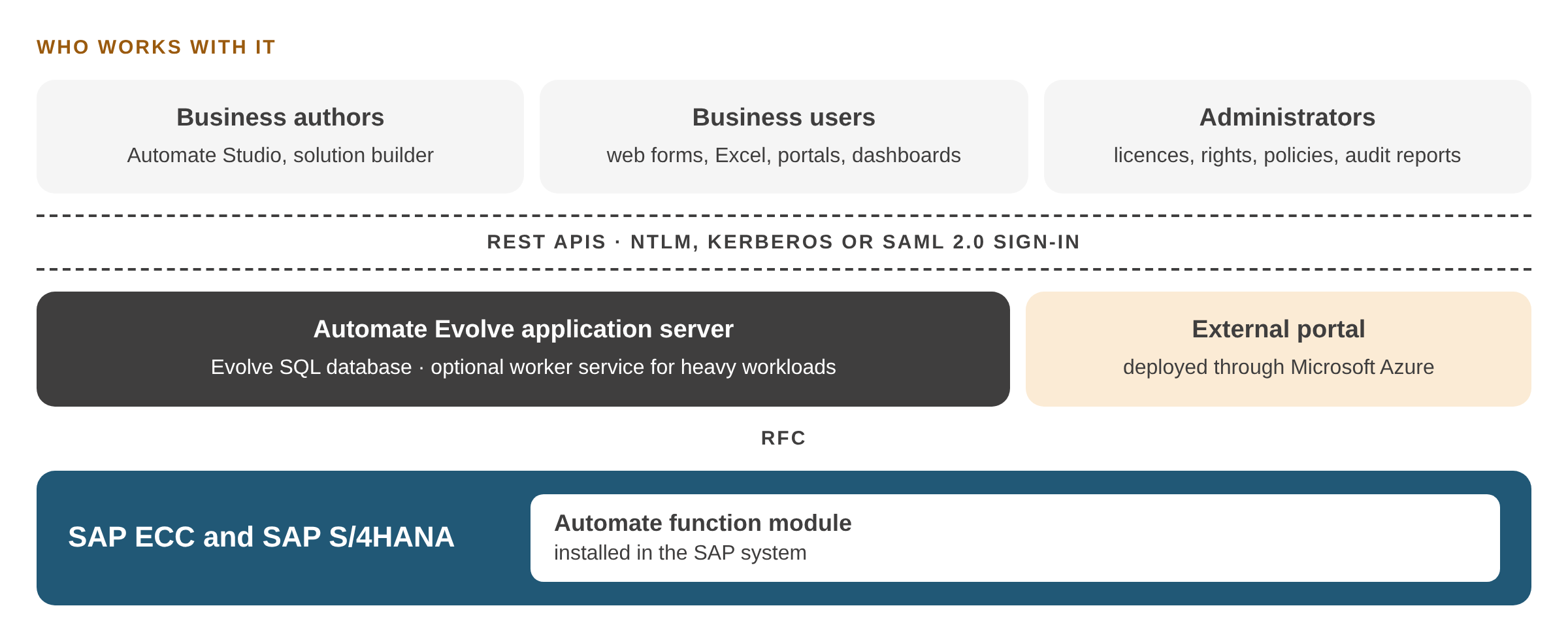
Business authors, business users and administrators work with the Evolve application server through REST APIs and NTLM, Kerberos or SAML 2.0 sign-in. Evolve connects to SAP ECC and SAP S/4HANA over RFC through the Automate function module; external portals are deployed through Microsoft Azure. Click the image to enlarge it.
Governance and administrationBusiness ownership, IT control
Process and data governance together
Rules, approvals and validations live in the workflow, so the process is followed and the data is right at the same time.
Inside SAP's rules
Evolve respects SAP user rights and permissions: people can only do what their SAP credentials allow.
Central administration
- Licences, user rights and policies
- Content approval before use
- Audit, usage, SLA and ROI reports
- Scheduled server-side SAP data exchange

ResultsWhat our clients report
Typical results from Automate Evolve workflows. One workflow typically takes one to three months to implement; a larger process, such as a new product introduction, can need several linked workflows.
95%
shorter lead time for new spare part master data, with a self-service solution
70%
higher productivity in New Product Introduction, without offline data entry
30%
less effort processing journal entries at month-end closing
90%
fewer top management approvals, with automated approval rules
30%
shorter lead time for critical master data maintenance
Client storiesAutomate Evolve in practice
Four workflows we delivered on Automate Evolve, in finance, asset management and master data.
Implementation and supportHow Novacon brings Evolve to your processes
We have worked with Precisely Automate since 2016, for clients in any country. Our work between 2021 and 2025:
15
large corporate clients in 13 countries
200+
projects
3,000+
development days
80+
training days
Our clients so far: Bulgaria, Croatia, Denmark, Finland, France, Hungary, Ireland, Italy, Poland, Slovakia, the United Kingdom, Saudi Arabia and the United States.
Solution Design & Implementation
We map the process with your teams, design the forms, rules and workflow, and take the solution live.
S/4HANA Transformation Support
Evolve workflows run on SAP ECC and S/4HANA side by side, which keeps processes stable during the move.
Precisely Automate Licence Audit & Optimisation
We check how your Automate licences are used and where they can be reduced or reassigned.
Frequently asked questionsQuestions we hear most often
Does Automate Evolve include Automate Studio?
Yes. Evolve includes Automate Studio and the Studio Manager administration features, so Excel-based SAP automation and workflows run on one platform.
Can customers and vendors use Evolve without SAP access?
Yes. External portals, deployed through Microsoft Azure, let them enter and update their own data in web forms. Your team reviews it in the workflow before it is posted to SAP.
Can AI agents work with Automate Evolve?
Yes. Since release 26.1, Evolve has a built-in MCP server, the Precisely Automate MCP Server. MCP-compatible AI assistants such as Claude, ChatGPT and Microsoft Copilot can run Studio scripts, read SAP data through OData APIs and work with Evolve tasks and processes, while rules and approvals stay in the workflow.
How long does it take to build a workflow?
Typically one to three months for one workflow. A larger process can need several linked workflows that are built step by step.
Does Novacon implement Automate Evolve outside Hungary?
Yes. We implement Automate Evolve wherever the client is. Our projects include a regional distribution centre in England serving the UK and Ireland, a global telecommunications company headquartered in Finland, and a beverage manufacturer’s centre in Bulgaria that serves Europe, Asia and Africa. Projects run in English.
See Automate Evolve on one of your own processes.
ContactTalk to an expert
Tell us which SAP process or product you are looking at. One of our consultants will get back to you.
- We read your message and pass it to the consultant who knows the topic.
- We contact you to agree on a short call.
- If you wish, we show a demo on a process like yours.
Prefer to write directly?
info@novacon.hu
NOVACON ZRT.Headquarters
Hungary
INTERNATIONAL FOOTPRINTProjects in Europe

NOVACON ZRT.Headquarters
Hungary
INTERNATIONAL FOOTPRINTProjects in Europe
KNOWLEDGE SHARINGNovacon community
Copyright 2026 Novacon Zrt. All rights reserved!
Copyright 2026 Novacon Zrt. All rights reserved!