
SAP-specific automationAutomate Studio:
SAP data automation from Excel
Novacon and PreciselyPrecisely partner since 2016
15 years of hands-on experience with the product.
What it isAn Excel front end for SAP data
Automate Studio is Precisely’s Excel-based automation tool for SAP ERP. It replaces manual data entry in SAP with templates that business users run themselves.
A business author records an SAP transaction or selects a BAPI, and maps its fields to a spreadsheet. Business users then fill in the spreadsheet and run it for one record or for thousands. Every run can be validated against SAP before anything is posted, so errors are corrected in Excel, not in the system.
Studio works with SAP ECC and SAP S/4HANA, follows SAP security and authorisations, and needs no ABAP. Automate Evolve includes Studio, so what you build here keeps working when you add forms and workflows later.
Product facts
- Vendor: Precisely (formerly Winshuttle Studio)
- SAP systems: SAP ECC, SAP S/4HANA; S/4HANA Public Cloud 2608 (release 26.1)
- SAP interfaces: SAP GUI, Fiori, SAP GUI for HTML, BAPI/RFM, OData services (S/4HANA)
- AI: Studio scripts as tools for AI assistants through the Precisely Automate MCP Server (Automate Evolve 26.1 and later)
- Works from: Microsoft Excel, Access, Google Sheets
- Certification: SAP Certified, Clean Core certified
- Licences: Managed in Precisely Studio Administrator; no server component needed
- Central control: Optional: Studio Manager (on-premises) or Evolve Cloud Essentials (SaaS)
- Our role: Implementation, training, support
The Precisely Automate familyFrom one SAP activity to end-to-end workflows
Each product contains the one before it and adds a layer.
1 · Automate the activityAutomate Studio
Exchange data with SAP quickly and easily using Excel.
- Data creation and maintenance
- Data migration
- Operational reporting
- Data stewardship
2 · Control it centrallyStudio Manager
Automate Studio
Share, manage and control Studio solutions across the enterprise.
- Centralised content management
- Granular control of licences, users and policies
- Audit and usage reporting
- Server-side job execution
- Web service execution
An on-premises server component. The SaaS alternative is Evolve Cloud Essentials.
3 · Digitalise the processAutomate Evolve
Automate StudioStudio Manager
Automate and streamline SAP business processes using workflows.
- Advanced form and workflow capabilities
- Cross-functional, end-to-end processes
- Data stewardship via web forms
- Detailed process analytics
- Web portals for external partners
- Third-party integration using REST APIs and other connections
The problem it solvesManual work in SAP
- Data that already exists electronically is typed into SAP by hand.
- Mass changes are done manually or wait for IT.
- Collecting SAP data means running several reports and merging them in Excel.
Our solutionSAP Automation
Need requests, approvals and an audit trail around the SAP step? That is Automate Evolve.
What it is forFour jobs it takes off your team
Data creation
Create master data such as materials, vendors and customers, and transactional data such as journal entries and invoices, in bulk.
Mass maintenance
Change thousands of records in one run: vendor updates, pricing changes, plant and storage location extensions.
Data migration
Load legacy data during an SAP implementation or a merger, and move data from SAP ECC to SAP S/4HANA.
Extraction and reporting
Pull live SAP data into Excel for ad-hoc and operational reports, correct it there, and load it back.
Across your whole SAP landscape
Studio is not limited to a list of supported processes. It works with every SAP module, with almost every transaction code and with any SAP table, including your custom-developed ones, and it needs no extra customisation to do so.
- Financial Accounting
- Controlling
- Sales and Distribution
- Materials Management
- Plant Maintenance
- Asset Management
- Project Systems
- Production Planning
- Quality Management
- Human Resources
- Custom transactions and tables
Where our clients use it most: master data
For example material, plant and storage location extension, purchase info record, bill of materials, routing, sales and vendor pricing, customer, vendor, business partner, G/L account, cost centre and profit centre.
Where our clients use it most: transactions
For example journal entries, vendor invoices, customer credit memos, purchase orders, goods movements, asset transactions and cost transfers.
These are the most common uses, not the limits of the product.
Key featuresSix ways to reach SAP
Studio connects to SAP through the interface that fits the task. The user experience stays the same: a spreadsheet and a Run button.
UploadTransaction
Record any SAP GUI transaction and turn it into an Excel template.
- Three steps: Record, Map, Run
- Validate data before posting to SAP
- Mandatory fields, allowed values, basic transformations
ExtractQuery
Build SAP extracts on a visual, drag-and-drop canvas.
- SAP tables, InfoSets and logical databases
- Inner and outer joins, flexible selection criteria
- Output to Excel, Access or text files
BAPI / RFMDirect
Use any SAP BAPI or remote-enabled function module (RFM) without ABAP.
- Create, extract and update data
- Reach functions that standard transactions do not offer
- Wildcard BAPI/RFM search
Web interfacesFiori and SAP GUI for HTML
Automate native SAPUI5 Fiori apps and SAP GUI for HTML.
- The same Excel-based experience as Transaction
- No-code script creation
New in release 26.1OData services
Query scripts that download SAP data through OData APIs, for SAP S/4HANA.
- OData V2 and V4
- Run locally, from the command line, from Excel or on a server schedule
Beyond ExcelGoogle Sheets
Run Studio scripts from Google Sheets when your company does not work in Excel.
- Add-on from the Google Workspace Marketplace
- SAP ECC and SAP S/4HANA
Combine them into one solution
Chains
Link Transaction and Query scripts so several steps run in sequence with one click.
Round trips
Extract from SAP, change the data in Excel and upload it again, all in one workbook.
Scheduling
Run templates unattended, overnight or as a background process.
Simulation
Test every line against SAP first, then post only what is correct.
How it worksRecord, Map, Run
over a secure SAP connection
1 · Record
A business author records the SAP transaction, or selects a BAPI, in Automate Studio.
2 · Map
The author maps the SAP fields to the columns of an Excel template.
3 · Run
Business users fill in the template and run it from Excel or Google Sheets.
Studio talks to SAP ECC or SAP S/4HANA over a secure RFC connection, through the Automate function module in SAP.
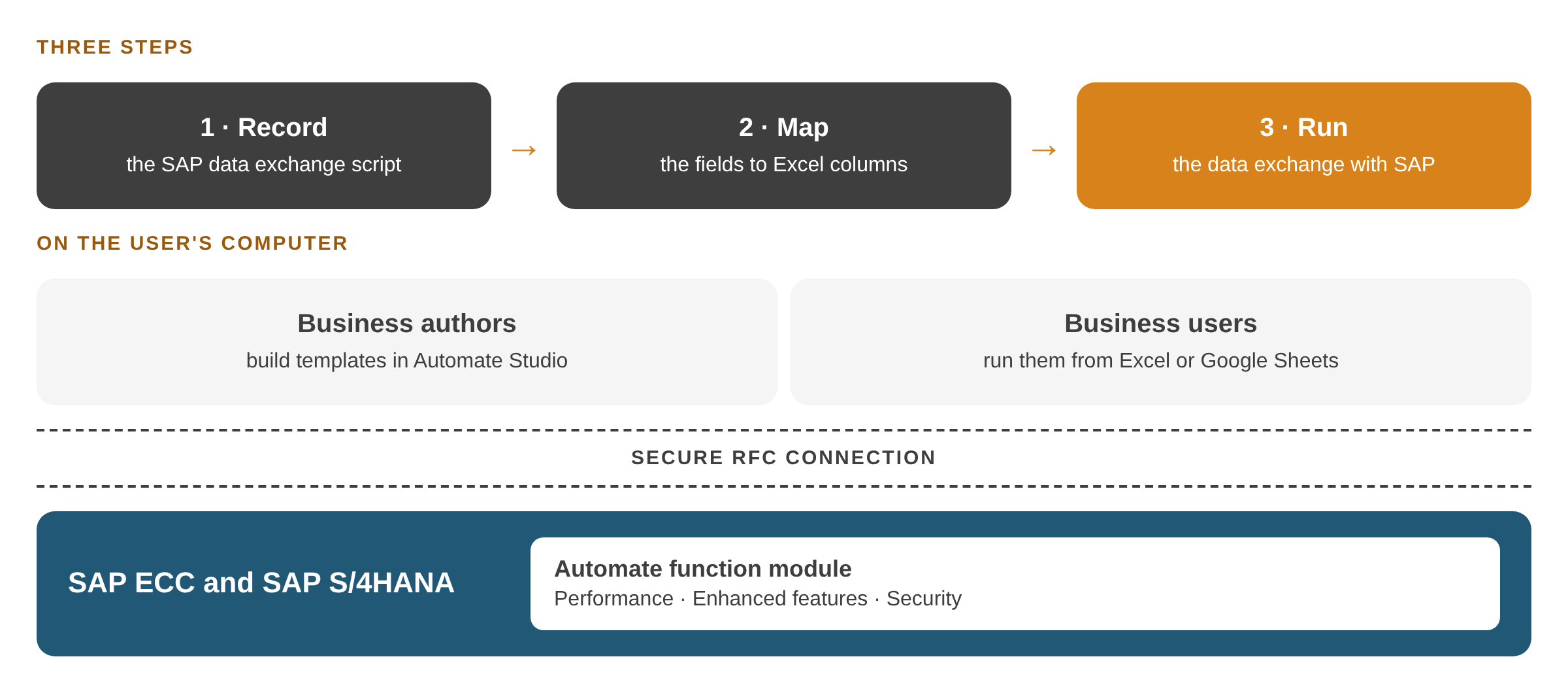
Three steps on the user’s computer: record the SAP script, map the fields to Excel columns, run the data exchange. Studio reaches SAP ECC and SAP S/4HANA over a secure RFC connection, through the Automate function module. Click the image to enlarge it.
Governance and administrationSelf-service for the business, control for IT
Inside SAP's rules
Studio follows SAP security, user authorisations and business rules. Administrators can limit who may extract data, when and how much.
Licence administration, included
Studio licences are managed on the Precisely Studio Administrator site. It needs no server component.
It covers licences only, not user permissions or scripts.
Full central administration, optional
Add Studio Manager (an on-premises server component) or Evolve Cloud Essentials (SaaS) for:
- A central library of scripts and templates
- Script approval before use, and an approval step before posting
- User roles and usage policies
- Scheduled, server-side job execution
- Audit, usage and savings reports

Client storyAutomate Studio in practice
A global telecommunications company headquartered in Finland posts its IFRS 16 journal entries with Automate Studio.
300k+
journal entries per quarter
5 days
posting window
99.9%
accuracy
~500
working hours saved per quarter
Implementation and supportHow Novacon brings Studio to your team
We have worked with Precisely Automate since 2016, for clients in any country. Our work between 2021 and 2025:
15
large corporate clients in 13 countries
200+
projects
3,000+
development days
80+
training days
Our clients so far: Bulgaria, Croatia, Denmark, Finland, France, Hungary, Ireland, Italy, Poland, Slovakia, the United Kingdom, Saudi Arabia and the United States.
Technology Training
Your business authors learn to build and maintain their own Studio scripts.
Application Management & Support
We keep your scripts and the platform running, and adapt them when SAP or the process changes.
SAP & non-SAP Data Migration
We use Studio to extract, validate and load data in SAP implementations and S/4HANA migrations. For SAP data migration we pair it with Data360 Analyze, which profiles, cleanses and transforms the data between extract and load.
Frequently asked questionsQuestions we hear most often
Does Automate Studio work with SAP S/4HANA?
Yes. Studio works with SAP ECC and SAP S/4HANA. On S/4HANA it can also automate Fiori apps and, since release 26.1, download SAP data through OData services.
How does Studio keep SAP secure?
Studio follows SAP security, user authorisations and business rules. Studio Manager adds script approval, usage policies and audit reports.
Do users need programming or SAP GUI skills?
No. Scripts are recorded and mapped without ABAP, and business users run them from Excel or Google Sheets.
What is the difference between Automate Studio and Automate Evolve?
Studio automates an SAP activity from a spreadsheet. Evolve adds web forms, workflows and approvals around it, and includes Studio.
Can AI assistants run Automate Studio scripts?
Yes, together with Automate Evolve. Since Evolve release 26.1, the Precisely Automate MCP Server exposes RFC, Fiori and SAP GUI for HTML Studio scripts as tools for MCP-compatible AI assistants such as Claude, ChatGPT and Microsoft Copilot, while existing security and governance controls stay in place.
See Automate Studio on one of your own SAP processes.
ContactTalk to an expert
Tell us which SAP process or product you are looking at. One of our consultants will get back to you.
- We read your message and pass it to the consultant who knows the topic.
- We contact you to agree on a short call.
- If you wish, we show a demo on a process like yours.
Prefer to write directly?
info@novacon.hu
NOVACON ZRT.Headquarters
Hungary
INTERNATIONAL FOOTPRINTProjects in Europe

NOVACON ZRT.Headquarters
Hungary
INTERNATIONAL FOOTPRINTProjects in Europe
KNOWLEDGE SHARINGNovacon community
Copyright 2026 Novacon Zrt. All rights reserved!
Copyright 2026 Novacon Zrt. All rights reserved!