
Data preparation & ETLData360 Analyze:
repeatable data flows, without code
Novacon and PreciselyPrecisely partner since 2016
15 years of hands-on experience with Precisely Automate Studio, the SAP side of a Data360 Analyze migration.
What it isA visual workbench for your data flows
Data360 Analyze is Precisely’s self-service data preparation and ETL tool. Users build data flows on a visual canvas in the browser: they connect sources, transform and validate the data, and publish the result to files, databases, BI tools or other systems.
It shows missing and outlying values and anomalies in the data logic early, and speeds up the discovery, validation, transformation and blending of data from across the organisation. Every step can be inspected and traced, so you see what happened to the data at each node. Shared data flows become trusted, reusable models in team workspaces, and run on a schedule, on a trigger or through the server REST API.
For SAP data migration it works best together with Automate Studio: Studio extracts the data from SAP and loads it back, Data360 Analyze cleanses, transforms and validates it in between.
Product facts
- Vendor: Precisely
- Type: Self-service data preparation, ETL and data flow automation
- Interface: Visual data flow designer, browser-based
- Sources: Files (CSV, Excel, XML), databases, big data platforms, web services and REST/SOAP APIs
- Outputs: Files, databases, BI tools (Qlik, Tableau, Spotfire) and web services
- Extensions: Python 3 node for custom logic
- Scale: Parallel processing and reusable data flows
- Security: Team workspaces with user access controls
- Automation: Scheduled data flows, server REST API, data flow outputs published as a service
- Editions: Desktop and Server
- Deployment: Installed in your own environment; not offered as SaaS
- SAP: Together with Automate Studio, which extracts data from SAP and loads it back
The problem it solvesData work that lives in spreadsheets
- Data from several systems is combined by hand in Excel or Access.
- Reconciliations and reports are rebuilt every month.
- Macros and scripts that only one person understands.
- Migration files are prepared manually, with no record of what changed.
- Missing values, outliers and broken data logic go unnoticed.
- Data quality problems show up only after the data is in SAP.
Our solutionData Flow Automation
Moving data into or out of SAP? Combine it with Automate Studio.
What it is forPrepare, check and move data, again and again
SAP and non-SAP data migration
Profile, cleanse, map and validate legacy data before every test and final load, and reconcile the result afterwards.
Recurring reconciliations and reports
Turn monthly spreadsheet work into a data flow that runs the same way every time.
Data quality checks
Find duplicates, gaps and outliers, and check data against your business rules.
Data exchange between systems
Combine, reconcile and restructure data from files, databases and APIs, and deliver it in the format the target system expects.
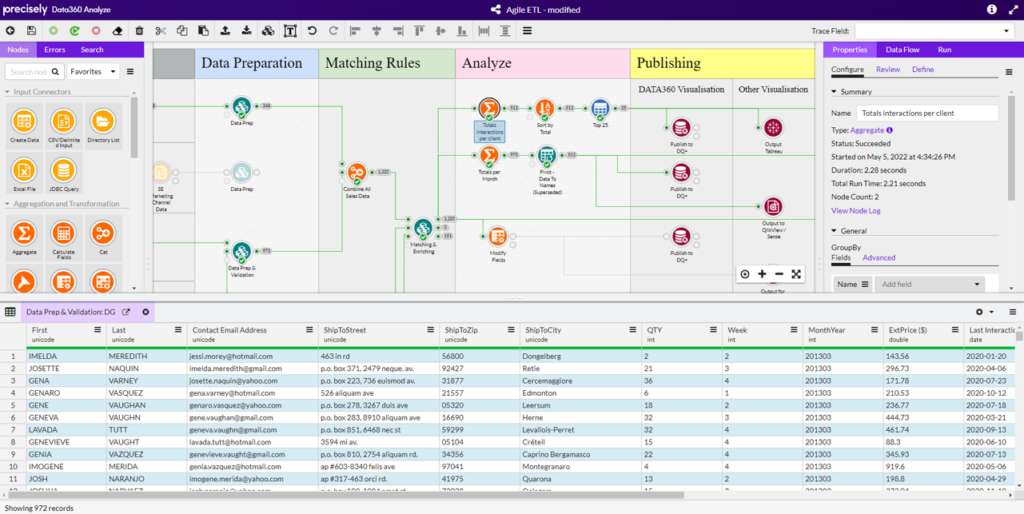
A Data360 Analyze data flow: data preparation, matching rules, analysis and publishing on one canvas, with the data at the selected node below. Source: Precisely.Click the image to enlarge it.
Key featuresSix capabilities of a reusable data flow
DesignVisual data flows
Build logic on a canvas, not in code.
- Drag-and-drop nodes on a browser-based canvas
- Pre-built source, function and output libraries for a quick start
- Business rules built by working directly on the data
InspectProfiling and data lineage
See the data at every step.
- Semantic identification classifies data attributes
- Distributions, missing and outlying values at a glance
- Inspect and trace the data at any step of the flow
TransformTransformation and matching
Turn raw data into a consistent dataset.
- Cleanse, convert, blend and aggregate
- Combine, reconcile and restructure data
- Fuzzy matching, conditional logic and a Python 3 node
ConnectConnectivity
Read and write where your data lives.
- Files: CSV, Excel, XML
- Databases and big data: Oracle, Teradata, Hadoop, Spark, MongoDB
- Web services: REST/SOAP APIs, Salesforce, SharePoint
AutomateAutomation and scheduling
From one-off analysis to a running process.
- Runs on a schedule or on other triggers
- Parallel processing for large data volumes
- Server REST API; outputs published as a service
CollaborateCollaboration and control
Business and IT on the same flows.
- Team workspaces with user access controls
- Shared data flows published as trusted models
- Shared library of reusable logic
How it worksSeven steps,
from source data to SAP
We follow the same seven steps Precisely uses for SAP S/4HANA migration. Automate Studio handles the SAP ends, extraction and loading; Data360 Analyze does the data work in between. The same flows run again for every test load and for the final cut-over.
- 1 · PrepareNovacon
People, process, data scoping, source systems and the target blueprint.
- 2 · ExtractAutomate Studio · Data360 Analyze
Build the connections, extract the data from SAP and other sources, and consolidate it.
- 3 · ProfileData360 Analyze
Analyse the data, check completeness and validate it with rules.
- 4 · CleanseData360 Analyze
Normalise, standardise and deduplicate, and verify with external sources.
- 5 · EnrichData360 Analyze
Add missing data from additional internal or external sources.
- 6 · Map & TransformData360 Analyze
Map the data to the target data model and transform it, including SAP-specific values and defaults.
- 7 · LoadAutomate Studio
Approve, validate and load the data into SAP.
Automate Studio and Data360 AnalyzeThe strongest pair for SAP data migration
In our portfolio, this is the best combination for SAP data migration. Automate Studio brings the SAP connection on both ends, extraction and loading. Data360 Analyze brings the data quality and transformation work in between.
SAP connectionAutomate Studio
- Extracts data from SAP tables and transactions
- Loads and updates data through SAP transactions and BAPIs
- SAP checks the data as it is posted
- Works with SAP ECC and SAP S/4HANA
- Run by business users from Excel
Data qualityData360 Analyze
- Profiles the legacy and SAP data
- Cleanses, standardises and deduplicates
- Maps and transforms to the target structure
- Validates against migration rules before loading
- Repeats the same flow for every test load
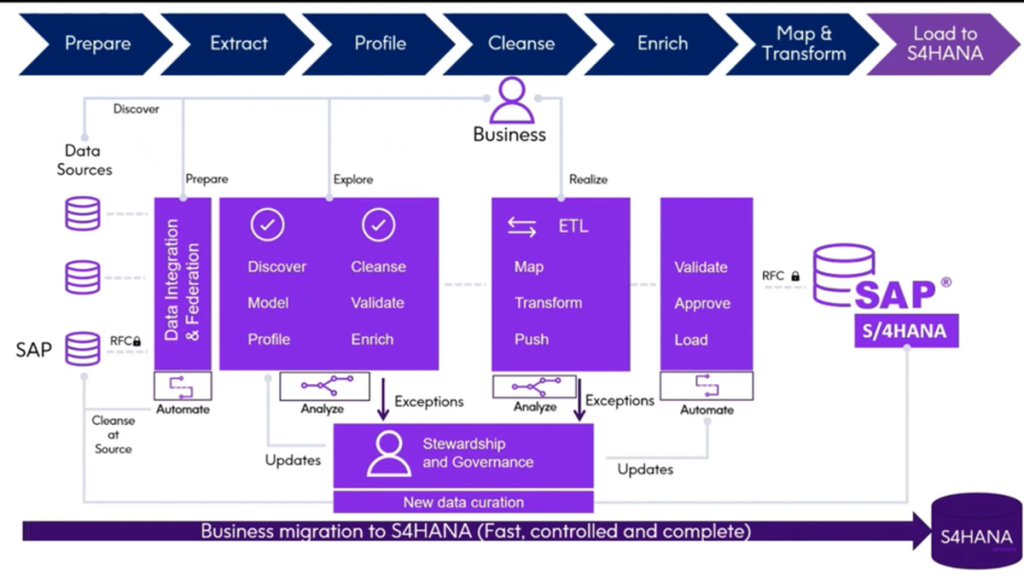
The seven migration steps from data sources to SAP S/4HANA: data integration, profiling and cleansing, ETL, then validation, approval and load over RFC, with stewardship handling the exceptions. Source: Precisely.Click the image to enlarge it.
How we can helpWhere Novacon comes in
We combine Automate Studio, which we have delivered since 2016, with our ETL experience to plan and run your data migration.
SAP & non-SAP Data Migration
We extract, cleanse, transform and load data between SAP and other systems, and reconcile the result.
S/4HANA Transformation Support
Clean, validated migration data is one of the foundations of a successful move to SAP S/4HANA.
Technology Training
Training and mentoring, so your own team can build, run and extend the data flows.
Frequently asked questionsQuestions we hear most often
Is Data360 Analyze an ETL tool?
Yes. It extracts, transforms and loads data, and adds self-service data preparation, profiling and validation on a visual canvas, so business users can build and run the flows too.
Is Data360 Analyze available as SaaS?
No. Data360 Analyze is installed in your own environment, as a desktop or a server product. For data integration as SaaS, Precisely offers the Data Integrity Suite.
How does Data360 Analyze work with SAP?
In our portfolio, the best combination for SAP data migration is Automate Studio with Data360 Analyze. Automate Studio extracts the data from SAP and loads it back through SAP transactions and BAPIs; Data360 Analyze profiles, cleanses, enriches, maps and transforms it in between.
Do users need to write code?
No. Data flows are built from pre-built nodes on a visual canvas, and business rules are built by working directly on the data. A Python 3 node is available for custom logic when needed.
Let us plan your next data migration together.
ContactTalk to an expert
Tell us which SAP process or product you are looking at. One of our consultants will get back to you.
- We read your message and pass it to the consultant who knows the topic.
- We contact you to agree on a short call.
- If you wish, we show a demo on a process like yours.
Prefer to write directly?
info@novacon.hu
NOVACON ZRT.Headquarters
Hungary
INTERNATIONAL FOOTPRINTProjects in Europe

NOVACON ZRT.Headquarters
Hungary
INTERNATIONAL FOOTPRINTProjects in Europe
KNOWLEDGE SHARINGNovacon community
Copyright 2026 Novacon Zrt. All rights reserved!
Copyright 2026 Novacon Zrt. All rights reserved!